%20--%3e%3crect%20width='1024'%20height='1024'%20rx='224'%20fill='%2316181d'/%3e%3cpath%20d='M%20292.8%20731.2%20A%20310%20310%200%201%201%20731.2%20731.2'%20fill='none'%20stroke='%238a909b'%20stroke-width='92'%20stroke-linecap='round'/%3e%3cpolygon%20points='700.1,329.6%20539.8,540.7%20484.2,483.3'%20fill='%23388bfd'/%3e%3ccircle%20cx='512'%20cy='512'%20r='44'%20fill='%23f2f3f5'/%3e%3c/svg%3e) Token Gauge
Token Gauge
v1.3 New: Antigravity — Gemini's new name, matching Google's rename
Know your limits before you hit them.
One quiet meter in the menu bar for Claude Code, Codex, Cursor, Copilot and Antigravity. Live percentages, spend and reset countdowns, so a rate limit never ambushes you mid-task again.
Claude Code metering is free — no account needed, and your code never leaves your machine.
For macOS 12+ (Apple Silicon) or Windows 10/11.
Why this exists
Token Gauge exists because Claude cut me off mid-refactor: context loaded, nearly done, and suddenly the only number on my screen was a reset time. The quota was always going to run out. What stung was that nothing warned me.
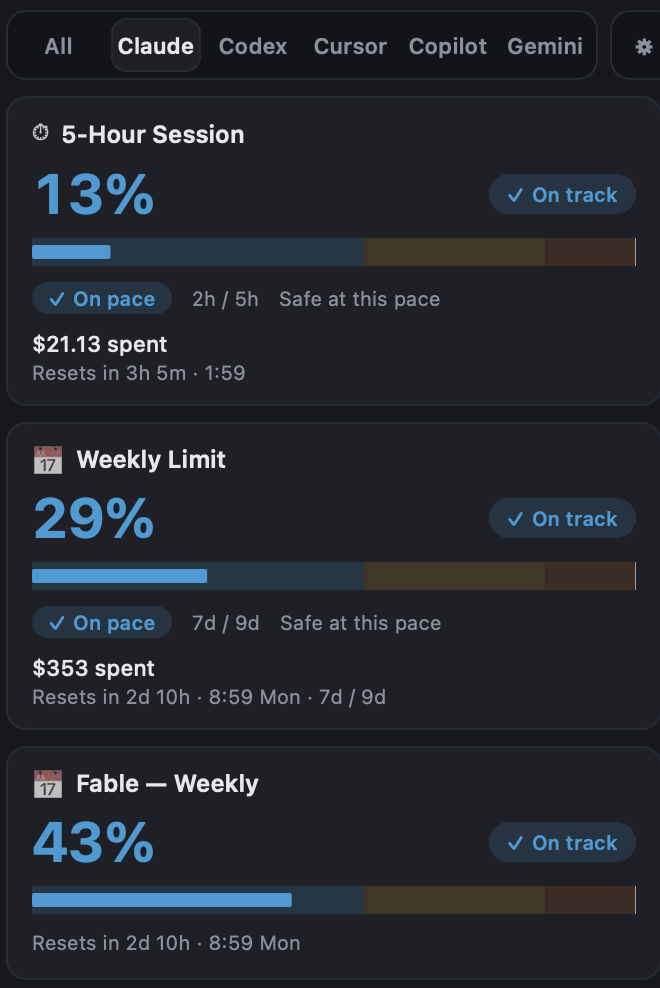
So now a number sits in my menu bar. It reads each provider's own usage signal and shows what's left and when it resets — the 5-hour window, the weekly cap, and (new in 1.1) each model's own weekly limit, like Fable's, which can run dry days before your overall week does.
It's a meter. It won't raise a limit, and where a provider doesn't publish a number, it says so instead of inventing one. It reads usage on your machine; your code and prompts never leave it. No account. No telemetry. $7.99 once — and if it isn't for you, email within 30 days and I refund you.
— kierz.io, one person · kierz@kierz.io is my actual inbox
What it shows — exactly
Five agents. No invented numbers.
One app tracks all your AI coding agents, and each row says exactly what its provider exposes — a true percentage where one exists, spend or token counts where one doesn't.
| Agent | What you see | Tier |
|---|---|---|
| Claude Code | Live 5-hour window, weekly cap and per-model weekly limits — true %, reset countdowns, alerts | Free |
| Codex | Live 5-hour and weekly usage % plus token counts | Lifetime |
| Cursor | Monthly request usage % and spend | Lifetime |
| Copilot | GitHub's own monthly-credits % — the same meter VS Code shows — plus real per-model spend | Lifetime |
| Antigravity | Token counts from Google's Antigravity CLI (and legacy Gemini CLI) logs — Google exposes no usage % | Lifetime |
Alerts fire at 80% and 95% by default (configurable) wherever a true percentage exists. Free claude.ai plans have no usage endpoint — Pro, Max, Teams and Enterprise are supported.
One price. No subscription.
Free for Claude Code. $7.99 once for everything. That's the whole pricing page.
Free
Claude Code metering
$0
- Live 5-hour window, weekly cap and per-model limits, with reset countdowns
- Alerts at 80% and 95%, before the wall
- No account — it works the minute it launches
- The whole download: 6 MB on Mac, 4 MB on Windows
Lifetime
All five agents, both platforms
$7.99 once
- Codex, Cursor, Copilot and Antigravity join Claude Code in one meter
- Your primary agent's gauge lives in the menu bar / system tray
- Mac and Windows on one license · 3 devices
- Every future agent and update included
- 30-day money-back — email me and it's done
Buying for a team? Email for a quote — one key per developer.
$7.99 is the price, not a launch trick. Checkout is handled by Lemon Squeezy, the merchant of record — your key is emailed the moment checkout completes, and every build ships from GitHub, where you can inspect it first.
Straight answers.
Yes — Apple Silicon (M-series) on macOS 12 or later. The app is ad-hoc signed but not notarized. On first launch, right-click the app → Open → Open. If macOS reports the app as “damaged”, run xattr -dr com.apple.quarantine /Applications/Token\ Gauge.app, then open again. On macOS Sequoia, use System Settings → Privacy & Security → Open Anyway. After the first successful launch, it opens normally from the menu bar.
Same app, same license — one purchase covers Mac and Windows, where Token Gauge lives in the system tray. The installer isn't code-signed yet, so SmartScreen warns on first run: choose More info → Run anyway. It's a one-time step, like the Mac's right-click → Open.
Claude Code, Codex and Cursor show a true usage percentage — for Claude Code that now goes down to per-model weekly limits, like a separate Fable bar. Copilot shows GitHub's own monthly-credits percentage, read from the same meter VS Code's dashboard uses, plus real per-model spend; where that meter isn't available it falls back to real consumption with no invented percentage. Antigravity — Google's successor to Gemini CLI — shows token counts only. The table above labels every row so you never mistake an estimate for a hard number.
No. Token Gauge is a meter: it shows your usage and reset timing so a limit never surprises you. It does not raise limits, add quota, or change what you pay your providers.
No. Token Gauge is local-first: it reads usage on your machine, and over the network it makes only three kinds of calls — each provider's own usage and sign-in endpoints, one Lemon Squeezy license check, and a check for app updates. Your code and prompts never leave the machine.
Three devices on one $7.99 license, lifetime updates included, no subscription — you buy it once and own it.
Yes. Checkout runs through Lemon Squeezy, the merchant of record — the receipt email includes a link to generate a full invoice with your company's details. At $7.99 it sits under most no-approval expense thresholds. For multiple seats, a quote, or a purchase order, email kierz@kierz.io and I'll sort it out — one license per developer, three devices each.
See the wall coming. Finish the task.
Free for Claude Code. All five agents, Mac and Windows, for $7.99 once.
Lost your license key? Recover it here.