%20--%3e%3crect%20width='1024'%20height='1024'%20rx='224'%20fill='%2316181d'/%3e%3cpath%20d='M%20292.8%20731.2%20A%20310%20310%200%201%201%20731.2%20731.2'%20fill='none'%20stroke='%238a909b'%20stroke-width='92'%20stroke-linecap='round'/%3e%3cpolygon%20points='700.1,329.6%20539.8,540.7%20484.2,483.3'%20fill='%23388bfd'/%3e%3ccircle%20cx='512'%20cy='512'%20r='44'%20fill='%23f2f3f5'/%3e%3c/svg%3e) Token Gauge
Token Gauge
Five AI agents in your Windows system tray
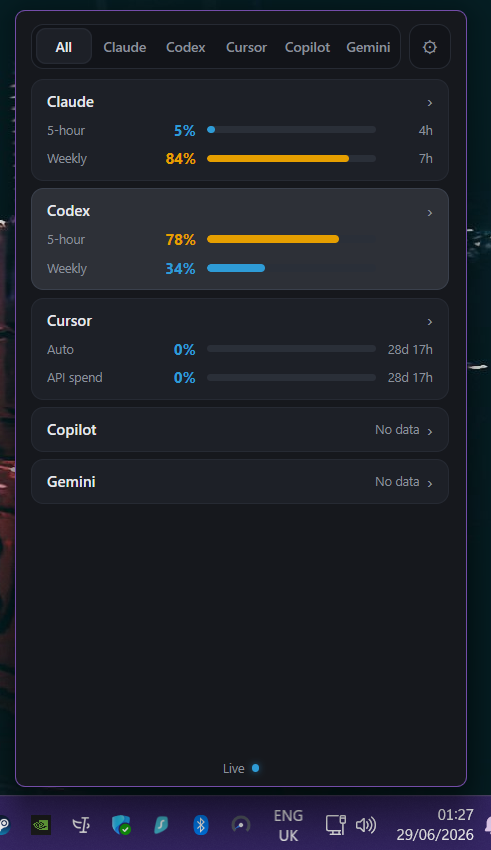
Most usage trackers for AI coding agents are Mac-only. Token Gauge isn't. It's a small, native app that sits in your Windows system tray and shows how much of each agent you have left — your Claude Code 5-hour window, weekly cap and per-model weekly limits, Codex rate-limits, Cursor usage and spend, Copilot consumption, and Antigravity token counts — without opening a browser tab.
One meter, five agents, on Windows
Click the tray icon and a single popover lists every connected agent with live numbers and reset countdowns. Pin your primary agent and the tray shows the number that matters at a glance. It's the same app and the same license as the Mac build — your one $7.99 purchase covers Windows and Mac, up to three devices, with no subscription.
Honest about what's tracked
Different providers expose different things, and we label every cell so you never mistake an estimate for a hard number. Claude Code, Codex and Cursor get a usage percentage; Copilot shows GitHub's own monthly-credits percentage plus real per-model spend, falling back to consumption-only where GitHub's meter isn't available; Antigravity — Google's successor to Gemini CLI — shows token counts only. See the full fidelity table.
Local reads, honest scope
Token Gauge reads usage on your machine — never your repositories, prompts or chat history. Over the network it makes only each provider's own usage calls plus one license check; it isn't fully offline, but your code and prompts never leave the machine. It gives you visibility and timing — it does not raise your limits, add quota or lower your bill.
Install note: the Windows installer isn't code-signed yet, so SmartScreen will warn on first run — choose More info, then Run anyway. Code signing is in progress. Download the standard NSIS installer from GitHub Releases.
Token Gauge for Windows — FAQ
Does Token Gauge run on Windows?
Yes — on Windows 10 and 11, it lives in the system tray. It's the same app and the same license as the Mac build; one $7.99 purchase covers both.
Why does Windows warn me when I install it?
The installer isn't code-signed yet, so SmartScreen shows "Windows protected your PC" on first run. Choose More info, then Run anyway. Code signing is in progress.
Which agents does it track on Windows, and how accurately?
Claude Code, Codex and Cursor are first-class with a usage percentage; Copilot shows GitHub's own monthly-credits percentage plus real per-model spend (falling back to consumption-only where GitHub's meter isn't available); Antigravity — Google's successor to Gemini CLI — shows token counts only. The fidelity table labels each one.
Can I install it with winget?
Not yet. For now, download the installer from GitHub Releases and run it directly.